Author: Jegor Janockin
Reviewed by: Curtain.lt editorial team
Last updated:
Brel curtain motors: how they work, are controlled and set up
- A Brel Home curtain motor is controlled in three ways: by a radio remote, by the app over Wi-Fi and, through the app, by voice assistants.
- A Wi-Fi motor joins the home network itself and needs no hub. A battery motor needs a Brel Home Box to reach the app (the Luna manual, p. 3).
- The motor learns its end positions from one opening and one closing.
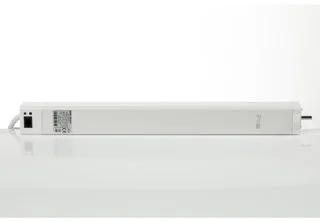
A motorised track is a ceiling track with a motor fitted at one end. This guide covers how the Brel Home motor itself works: how its two versions differ, how it is controlled and how the end positions are set. The figures come from the maker's own instructions, linked at the bottom of the page. Whether a motorised track pays off, what it costs and what to plan during a renovation are in the guides linked below.
How does a Brel motor move the curtain?
The motor sits at the end of the track and pulls the track's gliders, and with them the curtain. It stops at the end positions it has memorised: curtains open and curtains closed. In Brel's documents "bi-directional" means a two-way radio link (the motor and the remote exchange signals), not the direction in which the curtain opens. How a curtain opens, to one side or from the centre to both, is not described in Brel's documents; our one-way and two-way sets are described on the electric curtain tracks page.
- Speed
- 14 cm/s
- opening and closing
- Curtain weight
- up to 40 kg
- the maker's figure
- Torque
- 1.2 Nm
- both motor versions
- Radio frequency
- 433 MHz
- the remote's link to the motor
How does a wired Wi-Fi Brel motor differ from a battery one?
Brel's instructions describe two curtain-track motors that it calls "bi-directional". One is the wired Wi-Fi motor, the BG-980, and the other is the battery motor, the BGLE-980. Both work with the radio remote; they differ in how they reach the app.
| Wired Wi-Fi motor (BG-980) | Battery motor (BGLE-980) | |
|---|---|---|
| Power | 100–240 V AC, through a cable | Built-in Li-ion battery (4000 mAh), charged |
| App | Directly over the home Wi-Fi, no hub (BG-980 manual, p. 3) | Through a Brel Home Box (Luna manual, p. 3) |
| Remote | Yes, by radio | Yes, by radio |
| Speed and curtain weight | 14 cm/s, up to 40 kg | 14 cm/s, up to 40 kg |
| Before first use | The end positions are set | The battery is charged fully, then the end positions are set |
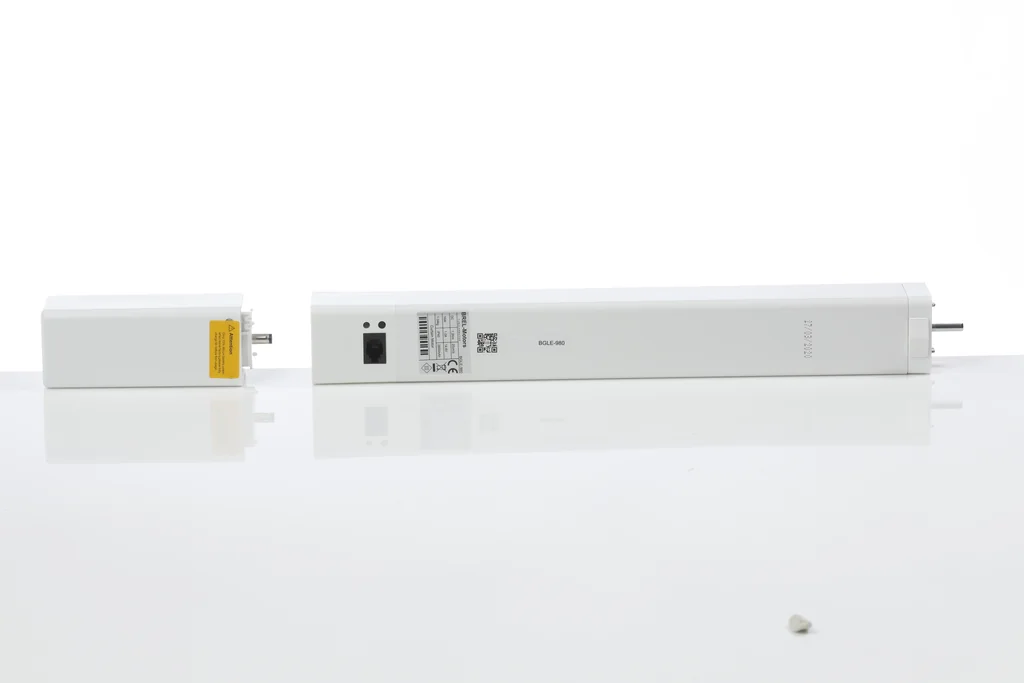
The instructions also cover the BG-45: a 230 V motor without a Wi-Fi function, which, like the battery motor, uses a Home Box for the app. The motor type for a given window is chosen in the project, from the track length, the weight of the curtains and whether a cable can be brought to the window.
How is a Brel motor controlled?
Control works on two levels. The remote talks to the motor directly by radio, and a wall switch is wired to the motor's port, so both work without the internet. The app, schedules and voice assistants need Wi-Fi: a Wi-Fi motor has it, and for the other motors a Home Box provides it.
Wi-Fi motor
Motor with a Home Box
- The remote. One remote has 15 channels and a channel 0 that controls every programmed motor at once. The maker advises one motor per channel.
- The Brel Home app. It lets you set timers and scenes, for example opening the curtains in the morning and closing them in the evening.
- Voice assistants. The maker's instructions say the Brel Home app can be linked to Siri, Google Home and Alexa.
- A wall switch. It is wired to the motor's port; its mode (a push button or a mechanical switch, for example) is chosen in the motor's settings.
- A radio wall transmitter. Besides the wired switch, Brel makes a 1-channel radio wall transmitter with a battery (TWW2001).
The Home Box comes in three kinds: Mini is a USB Wi-Fi dongle, Duo is a Wi-Fi hub with an RS485 connection for mono- and bi-directional motors, and Ultra is a Wi-Fi hub with a UTP/PoE connection.
How are the end positions set?
The motor learns its end positions itself. A Wi-Fi motor can also be set up in the Brel Home app, following the app's steps; the steps below use the remote's buttons, as the maker's instructions describe them.
- 1Pairing: pick a free channel on the remote and pair the motor with it: the motor's P1 button, then STOP on the remote. The LED flashing and the motor moving up and down confirm each step.
- 2Direction: if the curtain moves the wrong way and no end positions are set yet, hold P1 for about 10 seconds to reverse it.
- 3Open: press OPEN once. The curtain opens, stops by itself and memorises the position.
- 4Closed: press CLOSE once. The curtain closes, stops by itself and memorises the position. The curtains are then ready to use.
- 5Favourite position: if wanted, a third position can be stored. Move the curtain to it, press P2, then STOP twice. Holding STOP for 3 seconds brings the curtain back to it.
The settings can be changed later: the open or closed position can be moved, one of three speeds chosen, a second remote added, or the positions deleted to start again. Changing the speed switches on a slow stop.
What else is worth knowing about a Brel motor?
- The motor must not be used in a damp place and must be kept from direct moisture, as the maker's instructions say.
- The aerial must stay intact: it must not be shortened or touch metal parts, or the signal weakens. That matters when the motor is hidden in a ceiling recess beside an aluminium track.
- Radio and Wi-Fi: the remote works at 433 MHz, and the Wi-Fi motor joins a 2.4 GHz network.
- A battery motor has to be charged fully before first use, with the charger the maker specifies (DC-216 in Europe).
- Electric curtain tracks → prices by length and technical data
- Are electric curtain tracks worth it? → when they pay off
- Motorised curtains in a smart home → the cable, the hub and scenes during a renovation
- Recessed curtain tracks → the motor and the cable in a ceiling recess
- Curtain heading tapes explained → a wave heading and the gliders
The motor is chosen in the project
The designer visits, assesses the windows, the cabling options and your home system, then proposes motors and tracks.
Arrange a consultationFrequently asked questions
Does a Brel motor work without the internet?
Yes. The remote controls the motor by radio and a wall switch is wired to the motor, so both work without the internet. The internet is needed only for the app, schedules and voice control.
Does the app need a hub?
Not for the Wi-Fi motor (BG-980): by the maker's instructions it connects to the Brel Home app over the home Wi-Fi without a hub. The battery motor (BGLE-980) and the BG-45 use a Brel Home Box for the app, as Brel's Luna manual (p. 3) states.
Which voice assistants work with the Brel Home app?
The maker's instructions say it can be linked to Siri, Google Home and Alexa. If the home runs another system, we check compatibility before the order.
How much curtain weight does a Brel motor pull?
The maker gives up to 40 kg for the Wi-Fi and the battery curtain motor. It pays to weigh a heavy, long curtain in advance, and a very wide window can be split between two motors.
Can the motor be used in a damp room?
No. Brel's instructions say the motor must not be used in a damp place and must be protected from direct moisture, so it should not be fitted in a bathroom, for example.
How many motors can one remote control?
One remote has 15 channels, plus channel 0, which controls every programmed motor at once. The maker advises one motor per channel.
The next step
If this guide has answered your questions, move on to a specific product or check your budget.